
More than one site
Two or more locations that someone needs to see together, or a head office that wants a view of the branches.
What a VMS does, how it differs from an NVR or a DVR, and an honest checklist for deciding whether your site needs one at all.
Home › What Is a VMS
A VMS is the software layer that sits between your cameras and the people who need to see them. It records the streams, shows them on a wall, lets someone find a moment from last Tuesday, and decides who is allowed to do which of those things.
A camera produces a stream. A recorder stores it. A video management system is what turns a pile of streams and recordings into something an organisation can actually operate — across sites, across shifts, and months after the fact.
If you have one building and one recorder, you may never need one. The moment you have three sites, four people with different permissions, and an auditor who wants to know who downloaded a clip, you do.
A DVR takes analogue cameras and digitises them. An NVR records IP cameras, usually the ones plugged into it, usually in one building. A VMS is software that can manage cameras and recorders across many buildings, from many manufacturers, with proper user management on top. DVR and NVR are boxes; a VMS is software, and it often runs above the boxes you already have.
An honest checklist. If you are ticking one or two, an NVR is probably enough and we will tell you so.
Two or more locations that someone needs to see together, or a head office that wants a view of the branches.
Operators, supervisors, IT and auditors who should not all have the same powers over the footage.
If people ask for clips — for incidents, insurance, HR or police — search speed stops being a luxury.
A stated number of days you are required to keep, and the ability to prove you kept it.
Once there are more tiles than an operator can watch, you need the system to raise its hand.
Different manufacturers from different years, each with its own software. A VMS is what makes them one system.
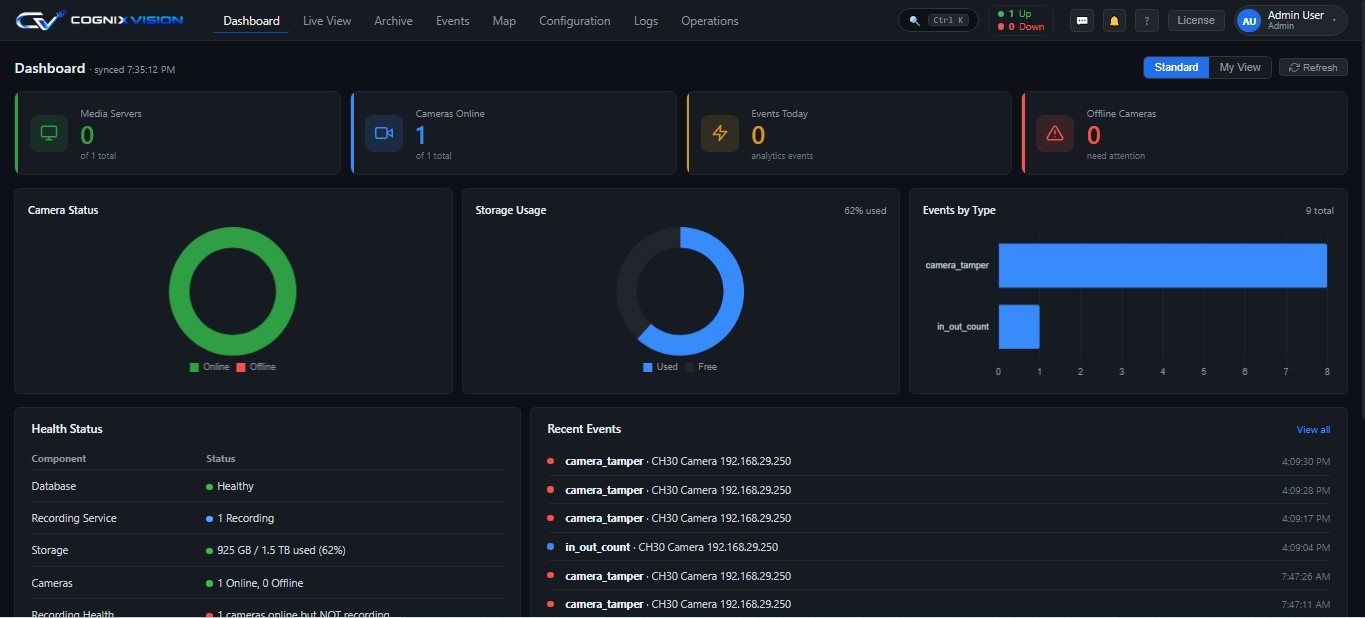
This is the Cognix Vision VMS dashboard. Cameras online, storage consumed, events today and the health of each service — the four things a control room checks at the start of a shift.
No. An NVR is a box that records the cameras connected to it. A VMS is software that manages cameras across many recorders and many sites, and adds search, roles, alerts and analytics on top. Many sites run a VMS over the NVRs they already own.
Probably not. One site, one recorder, one person watching — an NVR is fine and cheaper. A VMS starts paying when you have several sites, several people with different permissions, or a need to find footage quickly.
Usually yes, over ONVIF or RTSP. That is often the cheapest way to modernise: keep the hardware, replace the software layer that sits on top of it.
Cloud is simpler to start and costs per camera every month, with your video on someone else's infrastructure. On-premise costs more up front and keeps the footage on your network. For multi-site industrial and government work in India, on-premise is usually the answer, and it is what we build for.
The software is one part. Storage is usually the bigger number: camera count multiplied by resolution, frame rate and how many days you must keep. Get the retention requirement right before comparing quotes.
Tell us your site count, camera count and how often someone asks for a clip. If an NVR is the right answer for you, we will say so.